Executive Summary
If you think your business is safe from credential theft because you have Multi-Factor Authentication (MFA) enabled, you are operating on a false sense of security. Traditional MFA—including SMS codes, authenticator apps, and push notifications—is no longer enough to stop modern cybercriminals.
Today’s attackers don’t bypass MFA; they simply exploit the session cookies generated after your user successfully logs in. By tricking employees into landing on proxy websites, adversaries steal these live session tokens, completely neutralizing your standard identity defenses. Moving to phishing-resistant MFA is no longer a luxury for enterprise giants—it is an immediate operational necessity for mid-sized organizations.
The Illusion of the Secure “Lock”
For years, leadership teams have treated MFA as the ultimate checkbox item for compliance and cybersecurity insurance. You rolled out standard application-based push notifications, breathed a sigh of relief, and assumed the front door was locked.
The unsettling truth? Cybercriminals have adapted with terrifying efficiency.
They have shifted their focus from stealing static passwords to hijacking active user sessions. When your employee dutifully approves a push notification or types in a six-digit code on a sophisticated lookalike page, they aren’t just logging in. They are inadvertently handing over the keys to the digital kingdom.
The Anatomy of an Adversary-in-the-Middle (AitM) Attack
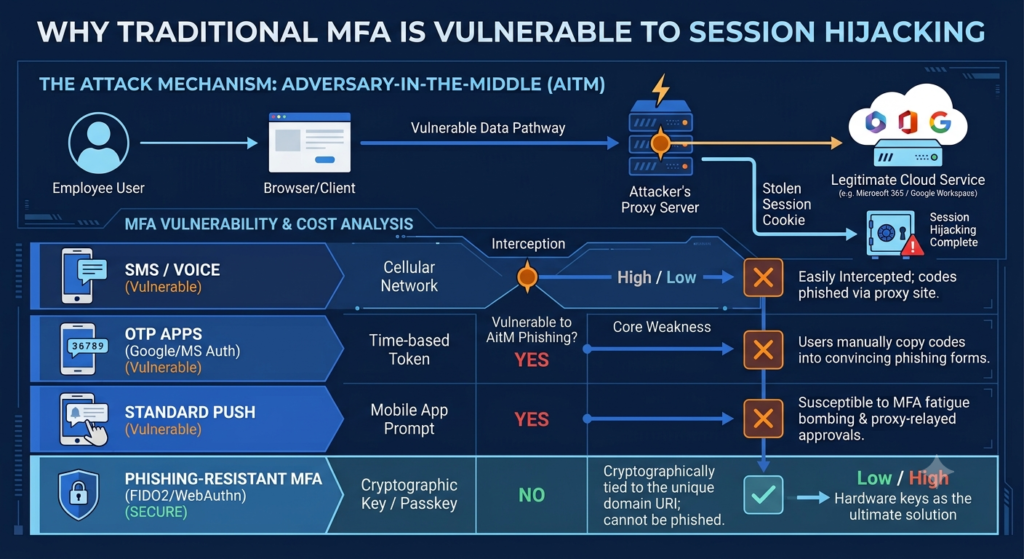
To understand why traditional MFA fails, we have to look at how modern phishing works. Attackers now deploy Adversary-in-the-Middle (AitM) proxy servers.
Instead of a static fake page that just copies a password, the attacker sets up a live, working proxy between your employee and the actual cloud service (like Microsoft 365 or Google Workspace).

The employee enters their credentials and completes the standard MFA prompt on what looks like a normal login screen. The proxy passes this information to the real service, which grants access and sends back a session cookie.
The attacker snatches that cookie out of mid-air. With that active token, they can clone the authenticated session on their own machine, bypassing your MFA entirely without ever needing to know the user’s actual password.
Why Standard MFA Can’t Stop the Bleeding
The core vulnerability relies on a simple architectural flaw: standard MFA methods are not cryptographically bound to the specific website domain the user is visiting.
The Vulnerability Matrix
| MFA Method | Delivery Mechanism | Vulnerable to AitM Phishing? | Core Weakness |
| SMS / Voice | Cellular Network | Yes | Easily intercepted; codes can be entered into proxy sites manually. |
| OTP Apps (Google/MS Auth) | Time-based Token | Yes | Users blindly copy numbers into convincing proxy phishing forms. |
| Standard Push Notifications | Mobile App Prompt | Yes | Susceptible to “MFA fatigue” bombing and proxy-relayed approvals. |
| Phishing-Resistant MFA (FIDO2) | Hardware Key / Passkey | No | Cryptographically tied to the unique domain URI; cannot be phished. |
Standard authentication methods rely entirely on the human user to verify that the website URL is legitimate. As phishing proxies become indistinguishable from the real thing, expecting employees to catch microscopic URL anomalies is a losing strategy.
The Phishing-Resistant Paradigm: Cryptographic Certainty
Phishing-resistant MFA removes human error from the authentication equation entirely. Built on FIDO2/WebAuthn standards, this approach replaces shared secrets (like codes or pushes) with asymmetric cryptography.
When a user logs in using a phishing-resistant method—such as a physical YubiKey or built-in device biometrics like Windows Hello or Apple Touch ID—the browser handles the authentication directly with the hardware.
The cryptographic key will only unlock if the exact, registered domain matches the site in the browser address bar. If an employee lands on login.micros0ft.com instead of login.microsoft.com, the hardware key recognizes the mismatch instantly and refuses to send the credentials. The attacker’s proxy gets absolutely nothing.
Strategic Next Steps for Mid-Market Leadership
Transitioning to a phishing-resistant architecture doesn’t have to paralyze your daily operations. You can implement this shift systematically.
1. Identify Your High-Value Targets
You do not need to buy hardware keys for every single user on day one. Begin by mapping out your highest-risk personas. Finance teams, IT administrators, HR personnel, and executives should be migrated to FIDO2 keys or device-bound passkeys immediately.
2. Audit Your Identity Provider (IdP) Capabilities
Review your current identity platform (e.g., Okta, Microsoft Entra ID). Ensure your conditional access policies are configured to explicitly demand phishing-resistant authentication for critical corporate applications and cloud infrastructure.
3. Transition Away from Legacy Fallbacks
An authentication chain is only as strong as its weakest link. If you allow users to bypass a secure passkey by clicking “Sign in another way” and choosing an SMS code, attackers will exploit that fallback loop. Gradually deprecate legacy MFA options.
Moving Beyond the Compliance Checkbox
Securing a modern business requires moving past the mindset of compliance for compliance’s sake. Traditional MFA was designed for a threat landscape that no longer exists.
As session hijacking tools become open-source and easily accessible to entry-level hackers, sticking with basic push notifications is a calculated gamble with increasingly poor odds. Upgrading to phishing-resistant authentication is the single most impactful move a mid-sized business can make to secure its data, protect its reputation, and neutralize identity theft at the source.