
Executive Summary
Malicious Browser Extensions have quietly evolved from harmless productivity boosters into one of the most pervasive, unmanaged attack vectors in the modern enterprise. Because extensions execute within the authenticated browser context, malicious or compromised plugins bypass traditional Endpoint Detection and Response (EDR) tools, quietly logging keystrokes, capturing session tokens, and scraping sensitive corporate data. Mitigating this risk requires moving away from total reliance on endpoint agents and establishing explicit, centralized browser governance.
- The Shadow IT Expansion: Employees regularly install unvetted extensions to streamline daily tasks, unintentionally granting third-party code access to every web application they use.
- The Keylogging Exploitation: Malicious plugins leverage standard browser APIs to record keystrokes, capturing plain-text credentials, personal identifiable information (PII), and proprietary data before encryption occurs.
- The Blind Spot: Traditional antivirus and network firewalls rarely flag extension activity because the traffic originates from a trusted, signed application—your web browser.
- The Strategic Remediation: Securing the browser environment demands a proactive administrative model using force-installed policies, explicit allowlists, and continuous extension risk auditing.
The modern enterprise runs inside the browser. From SaaS-based CRM platforms and financial ledgers to internal development environments, the browser has effectively replaced the traditional operating system desktop as the primary work portal.
Yet, while enterprise security teams spend millions hardening operating systems, deploying EDR agents, and locking down network perimeters, a massive side door remains wide open. Employees routinely install browser extensions to block ads, format text, translate languages, or manage passwords.
What few executives realize is that these lightweight, convenient plugins often possess full visibility into every character typed and every page rendered inside that browser session. When a plugin turns malicious—whether by design or through an acquisition by bad actors—it becomes an unmonitored keylogger operating directly inside your secure perimeter.
The Anatomy of the Extension Threat Vector
To understand why browser plugins are uniquely dangerous, you must look at how browser permissions function. When an employee clicks “Add to Chrome” or “Add to Firefox,” they are frequently prompted to grant the extension permission to “read and change all your data on the websites you visit.”
To an average employee, this prompt looks like routine operational boilerplate. To a CISO, it represents a complete surrender of data confidentiality.
1. The Over-Privileged Reality
Most popular productivity extensions require permission to inject scripts into the active Web page (DOM). This access is necessary for a grammar checker to highlight text or a password manager to autofill fields. However, once a plugin has DOM access, it can read plain-text input fields in real time. Before your enterprise SSO encrypts a password, or before your cloud portal saves a customer record, the plugin has already seen the keystrokes.
2. The Trojan Horse Acquisition Strategy
A major challenge with browser extensions is the supply chain attack model unique to plugin marketplaces. A developer creates a benign, highly useful extension that garners hundreds of thousands of users. Years later, a threat actor buys the extension from the original developer.
With a silent update pushed through the official browser store, the attacker injects malicious keylogging or session-hijacking code. No employee clicked a suspicious link, and no system administrator approved a software upgrade. The trusted tool simply turned into spyware overnight.
3. Bypassing Traditional Security Controls
Traditional endpoint security relies on detecting abnormal process creation, unauthorized file writes, or known malware signatures. A malicious browser extension does not drop a executable file onto the disk, nor does it spawn an untrusted background process. It operates entirely within the memory space of chrome.exe or msedge.exe. Because the browser is a trusted, signed application making outbound HTTPS requests, standard security controls rarely raise an alarm.
Visualizing the Attack Surface: Extension Permissions vs. Risk Level
Evaluating plugin safety requires auditing the specific permissions granted to extensions across your fleet.
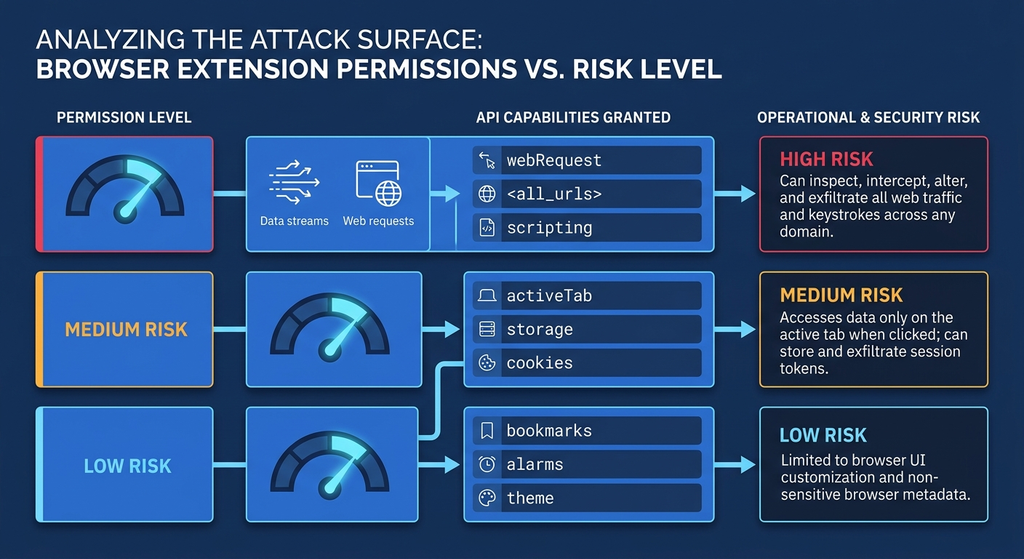
The matrix above illustrates how standard extension capabilities translate directly into corporate risk. Extensions requesting broad host permissions (<all_urls>) combined with dynamic script injection capabilities present an immediate keylogging risk, regardless of the developer’s current reputation.
Moving from Reactive Blindness to Active Browser Governance
Taming the extension ecosystem does not mean stripping employees of tools that boost productivity. Instead, leadership must shift from an unmanaged, honor-system approach to strict administrative control.
Establish an Explicit Browser Allowlist
The default state for enterprise browser extensions should always be block-all. Relying on users to judge security prompts is a strategy doomed to failure. Group Policy Objects (GPO) and Mobile Device Management (MDM) solutions allow security teams to deploy explicit allowlists, blocking all unapproved extension installations by default.
Implement Centralized Extension Management
Modern enterprise browsers, including Google Chrome Enterprise and Microsoft Edge for Business, provide centralized management consoles. These portals allow IT leadership to review requested permissions across the entire organization, force-install essential security plugins, and automatically block extensions that request dangerous permissions like global web request interception.
Conduct Regular Permission Audits
Permissions granted to an extension today may not be safe tomorrow. Security teams must continuously audit installed extensions across the enterprise fleet, identifying plugins that have been abandoned by their original authors, removed from official web stores, or updated to request elevated permissions.
Enforce Isolated Browsing Contexts for Critical Roles
For personnel handling sensitive financial transactions, customer PII, or core infrastructure administration, browser extensions should be banned entirely. Privileged access management (PAM) frameworks should mandate dedicated, hardened browser profiles with zero extensions enabled for administrative tasks.
Reclaiming Control of Your Digital Workspaces
The browser is no longer just an application; it is the desktop operating system of modern business. Treating browser extensions as harmless browser customizations leaves your enterprise vulnerable to silent, persistent data exfiltration operating right under the nose of your endpoint defenses.
By treating plugins with the same rigorous governance applied to enterprise software, business leaders can eliminate a critical blind spot, protect sensitive user inputs, and maintain workforce productivity without sacrificing security.