Executive Summary
When outdoor temperatures spike, the modest IT closet inside your office becomes a ticking financial clock. Unlike enterprise data centers with dedicated chillers, mid-sized business server rooms often rely on building HVAC that shuts down over weekends, leading to rapid heat accumulation, hardware degradation, and catastrophic downtime.
Protecting these physical assets requires moving beyond “hope-based cooling” to a proactive strategy of targeted airflow, environmental monitoring, and automated fail-safes.
The Mid-Market Blind Spot: The Closet vs. The Climate
It is a familiar scene for many growing companies. A spare office, a supply room, or a literal broom closet gets converted into the central hub for network switches, storage arrays, and local servers.
For most of the year, this setup works well enough to remain invisible.
Then, the first major summer heatwave hits.
While leadership focuses on employee comfort and rising utility bills, that unventilated IT closet is quietly trapping radiant heat, creating a localized greenhouse effect that can quickly exceed safe operating limits.
The disconnect lies in treating IT infrastructure cooling as an afterthought of general building comfort.
Standard commercial HVAC systems are designed to regulate spaces for human occupants, typically shutting down or dialling back on weekends and evenings to save energy.
Your servers, however, do not take the weekend off. They generate constant, concentrated thermal energy, and without continuous climate control, a modern server rack can push a small closet past 40 °C (104 °F) in a matter of hours.
The Physics of Thermal Runaway in Small Spaces
To understand why summer poses such a distinct threat, we have to look at the mechanics of compact IT environments.
Servers pull cool air from the front, pass it over internal components like CPUs and power supplies, and exhaust hot air out the back. In a confined closet without dedicated air exchange, that hot exhaust air has nowhere to go. It circles back around to the intake, forcing the server to breathe its own exhaust.
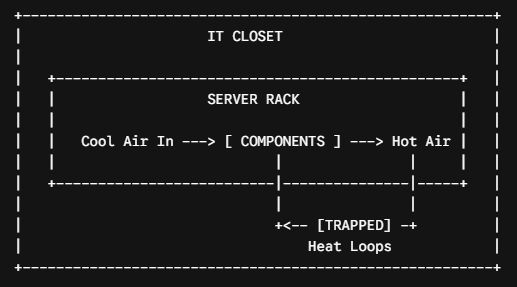
This creates a compounding cycle known as thermal runaway.
As the ambient temperature climbs, internal server fans spin faster, drawing more power and generating even more heat.
Once silicon chips cross their thermal thresholds, they automatically throttle performance to prevent melting, resulting in sluggish applications, dropped network connections, and unexplained system crashes.
If the temperature keeps rising, the hardware triggers an abrupt emergency shutdown to save itself, instantly halting your business operations.
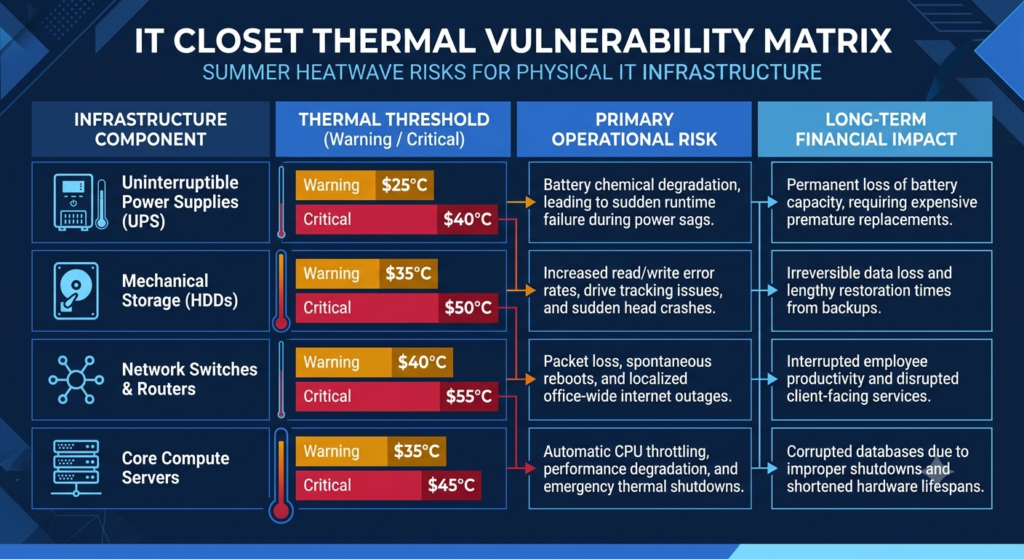
Evaluating the Threat: The Thermal Vulnerability Matrix
Not all hardware reacts to extreme heat the same way, and understanding where your primary risks lie is crucial for triaging your summer preparedness plan.
| Infrastructure Component | Thermal Threshold (Warning / Critical) | Primary Operational Risk | Long-Term Financial Impact |
| Uninterruptible Power Supplies (UPS) | 25°C/40 °C | Battery chemical degradation, leading to sudden runtime failure during power sags. | Permanent loss of battery capacity, requiring expensive premature replacements. |
| Mechanical Storage (HDDs) | 35 °C/50 °C | Increased read/write error rates, drive tracking issues, and sudden head crashes. | Irreversible data loss and lengthy restoration times from backups. |
| Network Switches & Routers | 40 °C/55 °C | Packet loss, spontaneous reboots, and localized office-wide internet outages. | Interrupted employee productivity and disrupted client-facing services. |
| Core Compute Servers | 35 °C/45 °C | Automatic CPU throttling, performance degradation, and emergency thermal shutdowns. | Corrupted databases due to improper shutdowns and shortened hardware lifespans. |
The data highlights a critical reality: your backup batteries (UPS) are often the first line of defense to fail when temperatures rise, even before the servers themselves shut down.
Practical Blueprint for Summer Proofing Your IT Closet
Mitigating these thermal risks does not necessarily require a multi-million dollar data center overhaul.
Substantial protection can be achieved through targeted engineering adjustments and smarter monitoring practices.
1. Re-Engineer the Airflow Dynamics
The simplest fixes often involve physical space management.
Ensure that the server rack has at least three feet of clearance from the walls both in the front and the back.
Replace solid closet doors with louvered or mesh-vented doors to allow passive air exchange with the main office floor.
If passive airflow is insufficient, install an active exhaust fan in the ceiling or wall to actively pull hot air out of the closet and dump it into the building’s return plenum.
2. Implement Networked Environmental Monitoring
You cannot manage what you do not measure.
Deploying standalone, IP-based temperature and humidity sensors inside the closet is one of the highest-return investments you can make.
Configure these sensors to send real-time SMS or email alerts the moment the closet crosses 27 °C (80 °F)
This gives your IT team a critical early-warning window to intervene before the hardware reaches its critical thermal threshold.
3. Establish Automated Graceful Shutdowns
If a heatwave causes a total HVAC failure over a weekend, your monitoring system needs to do more than just sound an alarm—it needs to act.
Configure your core servers with automated shutdown scripts tied directly to your environmental monitors or smart UPS systems.
If the room temperature sustains a critical high for more than fifteen minutes, the systems should automatically save active data, close databases, and power down gracefully, preventing the data corruption that accompanies an abrupt hardware thermal trip.
4. Deploy Dedicated Supplemental Cooling
When building HVAC variations are too volatile, look into dedicated, in-room cooling options.
Small, ceiling-mounted split-system air conditioners or industrial-grade portable spot-coolers can be installed specifically for the IT closet. Crucially, ensure these supplemental units run on a separate electrical circuit from the servers themselves, and verify that they are rated to run 24/7, independent of the central building automation system.

Physical IT infrastructure remains the backbone of your business operations, powering the local services, connectivity, and data security your team relies on daily. Letting a preventable external factor like a summer heatwave dictate your system uptime is an unnecessary operational risk. By treating thermal management as a core component of your risk mitigation strategy, you protect not just expensive silicon, but the continuity of your business itself.
As you plan for the warmer months ahead, take a walk down the hall and consider this: If your building’s air conditioning failed entirely this Saturday morning, how many hours would your core business applications survive before the heat turned them off permanently?